<?xml version="1.0" encoding="utf-8"?><?xml-stylesheet type="text/xsl" href="atom.xsl"?>
<feed xmlns="http://www.w3.org/2005/Atom">
    <id>https://docs.clippy.io/blog/</id>
    <title>Clippy - The AI Video Editor Blog</title>
    <updated>2026-06-27T00:00:00.000Z</updated>
    <generator>https://github.com/jpmonette/feed</generator>
    <link rel="alternate" href="https://docs.clippy.io/blog/"/>
    <subtitle>Clippy - The AI Video Editor Blog</subtitle>
    <icon>https://docs.clippy.io/img/favicon.ico</icon>
    <entry>
        <title type="html"><![CDATA[Introducing Clippy: The AI-Powered Video Studio Built for Marketing Teams]]></title>
        <id>https://docs.clippy.io/blog/ai-video-studio-for-marketing-teams/</id>
        <link href="https://docs.clippy.io/blog/ai-video-studio-for-marketing-teams/"/>
        <updated>2026-06-27T00:00:00.000Z</updated>
        <summary type="html"><![CDATA[Marketing teams are creating more video than ever — and they're drowning in it.]]></summary>
        <content type="html"><![CDATA[<p>Marketing teams are creating more video than ever — and they're drowning in it.</p>
<p>Product demos, social ads, email campaigns, onboarding videos, event recaps. The demand is relentless, the timelines are tight, and traditional tools were never built for this pace. Adobe Premiere takes hours. Hiring a video editor costs thousands. Outsourcing to an agency adds weeks.</p>
<p>There's a better way. We built Clippy for it.</p>
<h2 class="anchor anchorTargetStickyNavbar_Vzrq" id="what-is-clippy">What Is Clippy?<a href="https://docs.clippy.io/blog/ai-video-studio-for-marketing-teams/#what-is-clippy" class="hash-link" aria-label="Direct link to What Is Clippy?" title="Direct link to What Is Clippy?" translate="no">​</a></h2>
<p>Clippy is a cloud-based, AI-powered video creation studio that runs entirely in your browser. No downloads. No plugins. No six-figure software licenses.</p>
<p>It gives marketing teams — from solo operators to agencies managing dozens of clients — everything they need to produce professional-quality video content, fast.</p>
<p>Timeline editing, multi-track audio, AI auto-captions, transitions, effects, royalty-free stock assets, templates, and AI scene generation — all in one place, accessible from any device, anywhere in the world.</p>
<p>→ New to Clippy? Start with <a class="" href="https://docs.clippy.io/guides/first-project/">Your First Project</a> to get a video out in minutes.</p>
<hr>
<h2 class="anchor anchorTargetStickyNavbar_Vzrq" id="built-for-the-speed-marketing-demands">Built for the Speed Marketing Demands<a href="https://docs.clippy.io/blog/ai-video-studio-for-marketing-teams/#built-for-the-speed-marketing-demands" class="hash-link" aria-label="Direct link to Built for the Speed Marketing Demands" title="Direct link to Built for the Speed Marketing Demands" translate="no">​</a></h2>
<p>Here's the problem with most video tools: they were designed for filmmakers, not marketers.</p>
<p>They assume you have time. You don't.</p>
<p>Clippy is built around your workflow. You start from a template — we have over 10,000 for every format imaginable, from TikTok Reels to LinkedIn ads to product demos — and go from brief to finished video in minutes, not hours.</p>
<h3 class="anchor anchorTargetStickyNavbar_Vzrq" id="key-capabilities-that-matter-to-marketing-teams">Key capabilities that matter to marketing teams<a href="https://docs.clippy.io/blog/ai-video-studio-for-marketing-teams/#key-capabilities-that-matter-to-marketing-teams" class="hash-link" aria-label="Direct link to Key capabilities that matter to marketing teams" title="Direct link to Key capabilities that matter to marketing teams" translate="no">​</a></h3>
<p><strong>AI Auto-Captions</strong> — Upload a video and get accurate subtitles in seconds. Every platform penalises video without captions. We make it effortless. <a class="" href="https://docs.clippy.io/guides/captions/">See how captions work →</a></p>
<p><strong>AI Scene Creator</strong> — Describe the video you want and Clippy generates complete scenes from your text prompt. Ideal for concept videos, social content, and anything where you need visuals fast. <a class="" href="https://docs.clippy.io/guides/ai-video-agent/">Learn about the AI Video Agent →</a></p>
<p><strong>Stock Library</strong> — Millions of royalty-free videos, photos, and music tracks from Pexels and Unsplash, built directly into the editor. No switching tabs. No licensing headaches.</p>
<p><strong>Cloud Rendering</strong> — Export in up to 4K without taxing your machine. Render in the background while you keep working. <a class="" href="https://docs.clippy.io/guides/exporting/">How to export →</a></p>
<p><strong>Team Collaboration</strong> — Share projects with your team, get feedback, and manage assets in a shared workspace. No more emailing massive video files.</p>
<hr>
<h2 class="anchor anchorTargetStickyNavbar_Vzrq" id="scale-without-hiring">Scale Without Hiring<a href="https://docs.clippy.io/blog/ai-video-studio-for-marketing-teams/#scale-without-hiring" class="hash-link" aria-label="Direct link to Scale Without Hiring" title="Direct link to Scale Without Hiring" translate="no">​</a></h2>
<p>The math on video production doesn't work for most marketing budgets.</p>
<p>A skilled video editor costs $60–120K/year. A freelancer runs $75–200/hour. An agency charges five figures for a campaign. These models made sense when you needed one or two videos a month. They fall apart when your content calendar demands twenty.</p>
<p>Clippy changes the equation. Your existing team — writers, designers, social media managers — can produce polished video without a production background. The tools are intuitive enough that you barely need a tutorial, but powerful enough to handle everything from simple social cuts to multi-track brand films.</p>
<p>Teams using Clippy typically report cutting video production time by 70–80% and producing 3–5x more content with the same headcount.</p>
<hr>
<h2 class="anchor anchorTargetStickyNavbar_Vzrq" id="for-agencies-a-platform-built-to-scale">For Agencies: A Platform Built to Scale<a href="https://docs.clippy.io/blog/ai-video-studio-for-marketing-teams/#for-agencies-a-platform-built-to-scale" class="hash-link" aria-label="Direct link to For Agencies: A Platform Built to Scale" title="Direct link to For Agencies: A Platform Built to Scale" translate="no">​</a></h2>
<p>If you're managing video content across multiple clients, Clippy was designed with you in mind.</p>
<p>Our workspace model lets you keep client assets, projects, and brand kits neatly separated. Brand kit support means you can lock in each client's colours, fonts, and logos — so anyone on your team produces on-brand content every time, without a style guide review. <a class="" href="https://docs.clippy.io/guides/styles-and-brand-kit/">Set up a Brand Kit →</a></p>
<p>And because everything lives in the cloud, your team can work across time zones without the chaos of shared drives and version-control nightmares.</p>
<hr>
<h2 class="anchor anchorTargetStickyNavbar_Vzrq" id="whats-coming">What's Coming<a href="https://docs.clippy.io/blog/ai-video-studio-for-marketing-teams/#whats-coming" class="hash-link" aria-label="Direct link to What's Coming" title="Direct link to What's Coming" translate="no">​</a></h2>
<p>Clippy is already used by content creators, marketing teams, agencies, educators, and small businesses across 150+ countries. But we're just getting started.</p>
<p>On the roadmap: deeper AI automation for batch video generation (produce hundreds of personalised videos from a single template and a data file), expanded avatar and AI presenter tools, and direct publishing to social platforms.</p>
<hr>
<h2 class="anchor anchorTargetStickyNavbar_Vzrq" id="get-started-free">Get Started Free<a href="https://docs.clippy.io/blog/ai-video-studio-for-marketing-teams/#get-started-free" class="hash-link" aria-label="Direct link to Get Started Free" title="Direct link to Get Started Free" translate="no">​</a></h2>
<p>There's no better way to understand what Clippy can do than to try it.</p>
<p>Create your account in under 30 seconds — no credit card required. Import your footage, pick a template, and publish your first video today.</p>
<p><strong><a href="https://clippy.io/dashboard" target="_blank" rel="noopener noreferrer" class="">Start Creating Free →</a></strong></p>
<hr>
<p><em>Have questions? Reach out at <a href="mailto:hello@clippy.io" target="_blank" rel="noopener noreferrer" class="">hello@clippy.io</a> or explore the <a class="" href="https://docs.clippy.io/intro/">Documentation</a>.</em></p>]]></content>
        <author>
            <name>Clippy Team</name>
            <uri>https://clippy.io</uri>
        </author>
        <category label="Product" term="Product"/>
        <category label="Launch" term="Launch"/>
        <category label="AI Video Editor" term="AI Video Editor"/>
        <category label="Marketing" term="Marketing"/>
    </entry>
    <entry>
        <title type="html"><![CDATA[We Were Spending $8,000 a Month on Video Production. Then We Built Something Better.]]></title>
        <id>https://docs.clippy.io/blog/why-we-built-clippy/</id>
        <link href="https://docs.clippy.io/blog/why-we-built-clippy/"/>
        <updated>2026-06-27T00:00:00.000Z</updated>
        <summary type="html"><![CDATA[Eighteen months ago, our marketing director walked into my office with a spreadsheet.]]></summary>
        <content type="html"><![CDATA[<p>Eighteen months ago, our marketing director walked into my office with a spreadsheet.</p>
<p>It was our monthly video production spend: agency retainers, freelance editors, stock footage licences, motion graphics contractors. The total was $8,200. For a startup our size, that was painful. But what stung more was the output — four videos a month, each taking two to three weeks from brief to publish.</p>
<p>Four videos. Three weeks each. $8,000.</p>
<p>We were moving slower than our competitors, spending more than we could afford, and still couldn't keep up with the content demands of our social channels, email campaigns, and sales team.</p>
<p>We looked at the existing tools. Premiere Pro is industry-standard but has a steep learning curve — most of our team couldn't use it productively without weeks of training. CapCut is good for quick cuts but limited for anything polished. The browser-based editors we tried were either too basic or too slow.</p>
<p>So we built what we needed.</p>
<hr>
<h2 class="anchor anchorTargetStickyNavbar_Vzrq" id="the-core-insight">The Core Insight<a href="https://docs.clippy.io/blog/why-we-built-clippy/#the-core-insight" class="hash-link" aria-label="Direct link to The Core Insight" title="Direct link to The Core Insight" translate="no">​</a></h2>
<p>The fundamental problem with video production isn't talent — it's friction.</p>
<p>Every step in the traditional workflow adds delay. Brief → agency → first cut → rounds of feedback → revision → final export → upload. Each handoff is a place where time gets lost, context gets garbled, and costs accumulate.</p>
<p>We wanted a tool that collapsed that workflow. One where a marketer who has never touched video editing software could take a brief, pick a template, drop in footage, add captions, and publish — without ever leaving their browser.</p>
<p>That's Clippy. <a class="" href="https://docs.clippy.io/guides/first-project/">See how it works →</a></p>
<hr>
<h2 class="anchor anchorTargetStickyNavbar_Vzrq" id="what-ai-powered-actually-means-in-practice">What "AI-Powered" Actually Means in Practice<a href="https://docs.clippy.io/blog/why-we-built-clippy/#what-ai-powered-actually-means-in-practice" class="hash-link" aria-label="Direct link to What &quot;AI-Powered&quot; Actually Means in Practice" title="Direct link to What &quot;AI-Powered&quot; Actually Means in Practice" translate="no">​</a></h2>
<p>The industry is drowning in tools that claim to be "AI-powered" but use AI as a garnish, not a feature. We took a different approach: AI in Clippy is functional, not decorative.</p>
<p><strong>Auto-Captions</strong> generate accurate subtitles from any uploaded video in seconds. This alone saves our team hours every week — captions are now a default, not an afterthought. Engagement on captioned video is 40% higher. We were leaving that on the table every time we skipped them because it was too time-consuming. <a class="" href="https://docs.clippy.io/guides/captions/">How captions work in Clippy →</a></p>
<p><strong>AI Scene Creator</strong> lets you describe the video you want and generates complete scenes from a text prompt. This sounds like magic, but the practical use case is straightforward: when you need a concept video for a product that doesn't have footage yet, or a social ad that needs a visual treatment in two hours, you don't have time to brief a motion designer. You type, Clippy builds. <a class="" href="https://docs.clippy.io/guides/ai-video-agent/">Using the AI Video Agent →</a></p>
<p><strong>Smart Templates</strong> aren't just visual layouts — they're built around how marketing teams actually work. Format by format, platform by platform, with brand kit integration so your colours, fonts, and logo are locked in from the start. <a class="" href="https://docs.clippy.io/guides/styles-and-brand-kit/">Setting up your Brand Kit →</a></p>
<hr>
<h2 class="anchor anchorTargetStickyNavbar_Vzrq" id="what-changed-for-our-team">What Changed for Our Team<a href="https://docs.clippy.io/blog/why-we-built-clippy/#what-changed-for-our-team" class="hash-link" aria-label="Direct link to What Changed for Our Team" title="Direct link to What Changed for Our Team" translate="no">​</a></h2>
<p>Within 60 days of switching our marketing team to Clippy:</p>
<ul>
<li class="">We went from 4 videos/month to 17</li>
<li class="">Average production time dropped from 2.5 weeks to under 4 hours</li>
<li class="">We cut our external video spend by 85%</li>
<li class="">Three team members who had never edited video before were producing content independently</li>
</ul>
<p>The quality didn't suffer. If anything, the consistency improved — because everyone was working from the same templates, with the same brand assets, in the same tool.</p>
<hr>
<h2 class="anchor anchorTargetStickyNavbar_Vzrq" id="who-clippy-is-for">Who Clippy Is For<a href="https://docs.clippy.io/blog/why-we-built-clippy/#who-clippy-is-for" class="hash-link" aria-label="Direct link to Who Clippy Is For" title="Direct link to Who Clippy Is For" translate="no">​</a></h2>
<p>I want to be direct about this, because the video tool market is full of products that claim to be everything to everyone.</p>
<p>Clippy is built for <strong>marketing teams and agencies</strong> who need to produce professional video content at volume, without building out a production department.</p>
<p>That means:</p>
<ul>
<li class="">In-house marketing teams at growth-stage companies who need more content than their budget allows</li>
<li class="">Digital agencies managing video campaigns across multiple clients</li>
<li class="">Social media teams who need to publish daily and can't wait weeks for a finished video</li>
<li class="">Sales and demand-gen teams who want personalised video assets but can't justify a full video budget</li>
</ul>
<p>If you're a professional filmmaker making feature-length content, Clippy isn't for you. But if you're a marketing manager trying to hit your Q3 content targets, it might be the most important tool you add this year.</p>
<p>The full <a class="" href="https://docs.clippy.io/features/video-editor/">feature overview</a> and <a class="" href="https://docs.clippy.io/guides/first-project/">guides</a> cover the editor in detail if you want to dig deeper before signing up.</p>
<hr>
<h2 class="anchor anchorTargetStickyNavbar_Vzrq" id="the-bigger-picture">The Bigger Picture<a href="https://docs.clippy.io/blog/why-we-built-clippy/#the-bigger-picture" class="hash-link" aria-label="Direct link to The Bigger Picture" title="Direct link to The Bigger Picture" translate="no">​</a></h2>
<p>We're at an inflection point in content marketing. Video is no longer a premium add-on — it's the baseline. Every brand, at every scale, is expected to produce video. LinkedIn, email, social, your website, your sales decks — all of it.</p>
<p>The teams that win in this environment aren't the ones with the biggest production budgets. They're the ones who figured out how to move fast, stay on-brand, and iterate constantly.</p>
<p>That's the capability Clippy is built to give you.</p>
<hr>
<h2 class="anchor anchorTargetStickyNavbar_Vzrq" id="try-it">Try It<a href="https://docs.clippy.io/blog/why-we-built-clippy/#try-it" class="hash-link" aria-label="Direct link to Try It" title="Direct link to Try It" translate="no">​</a></h2>
<p>We offer a free plan — no credit card, no time limit, no gotchas. Import your footage, pick a template, publish a video. See what your team can do in an afternoon.</p>
<p><strong><a href="https://clippy.io/" target="_blank" rel="noopener noreferrer" class="">clippy.io</a></strong></p>
<p>If you want to talk through how Clippy fits your team's workflow, reach us at <a href="mailto:hello@clippy.io" target="_blank" rel="noopener noreferrer" class="">hello@clippy.io</a>.</p>
<hr>
<p><em>Clippy is used by creators, marketers, agencies, and businesses across 150+ countries. AI video editing, auto-captions, scene generation, stock assets, and cloud rendering — all in your browser.</em></p>]]></content>
        <author>
            <name>Clippy Team</name>
            <uri>https://clippy.io</uri>
        </author>
        <category label="Product" term="Product"/>
        <category label="Launch" term="Launch"/>
        <category label="AI Video Editor" term="AI Video Editor"/>
        <category label="Marketing" term="Marketing"/>
    </entry>
    <entry>
        <title type="html"><![CDATA[Introducing Clippy: Where Your Brand Meets AI Video]]></title>
        <id>https://docs.clippy.io/blog/introducing-clippy-deep-dive/</id>
        <link href="https://docs.clippy.io/blog/introducing-clippy-deep-dive/"/>
        <updated>2025-07-05T00:00:00.000Z</updated>
        <summary type="html"><![CDATA[An AI-powered video editor in your browser — create professional videos in minutes, no downloads, no complex software.]]></summary>
        <content type="html"><![CDATA[<p><img decoding="async" loading="lazy" alt="Clippy — AI video editor" src="https://docs.clippy.io/assets/images/og-default-bb44b3aed44aea38f9c4682e20603e57.webp" width="1200" height="630" class="img_ev3q"></p>
<p>You have a story. Maybe it's a product launch, a lesson your students need to remember, a reel that should feel unmistakably <em>yours</em>.</p>
<p>What you probably don't have is an afternoon to disappear into exports, font hunts, and "why does this caption look wrong on Instagram?"</p>
<p>That gap — between <em>I know what I want to say</em> and <em>I have a polished video that says it</em> — is exactly why we built <strong>Clippy</strong>.</p>
<hr>
<h2 class="anchor anchorTargetStickyNavbar_Vzrq" id="hi-were-clippy">Hi. We're Clippy.<a href="https://docs.clippy.io/blog/introducing-clippy-deep-dive/#hi-were-clippy" class="hash-link" aria-label="Direct link to Hi. We're Clippy." title="Direct link to Hi. We're Clippy." translate="no">​</a></h2>
<p><img decoding="async" loading="lazy" alt="Clippy logo" src="https://docs.clippy.io/assets/images/clippy-2806b5baeaf5f6962b612205e5635b3f.webp" width="512" height="512" class="img_ev3q"></p>
<p><strong>Clippy</strong> is an AI-powered video editor that runs in your browser. Create professional videos in minutes — no downloads, no complex software.</p>
<p>A single place to <strong>generate, edit, brand, and export</strong> — from a text idea to a finished timeline you'd actually post.</p>
<p>We're live at <strong><a href="https://clippy.io/" target="_blank" rel="noopener noreferrer" class="">clippy.io</a></strong>. Open the editor at <strong><a href="https://app.clippy.io/" target="_blank" rel="noopener noreferrer" class="">app.clippy.io</a></strong>. If you've ever wished your creative tools could think as fast as you do — you're in the right place.</p>
<hr>
<h2 class="anchor anchorTargetStickyNavbar_Vzrq" id="your-dashboard-your-projects">Your dashboard, your projects<a href="https://docs.clippy.io/blog/introducing-clippy-deep-dive/#your-dashboard-your-projects" class="hash-link" aria-label="Direct link to Your dashboard, your projects" title="Direct link to Your dashboard, your projects" translate="no">​</a></h2>
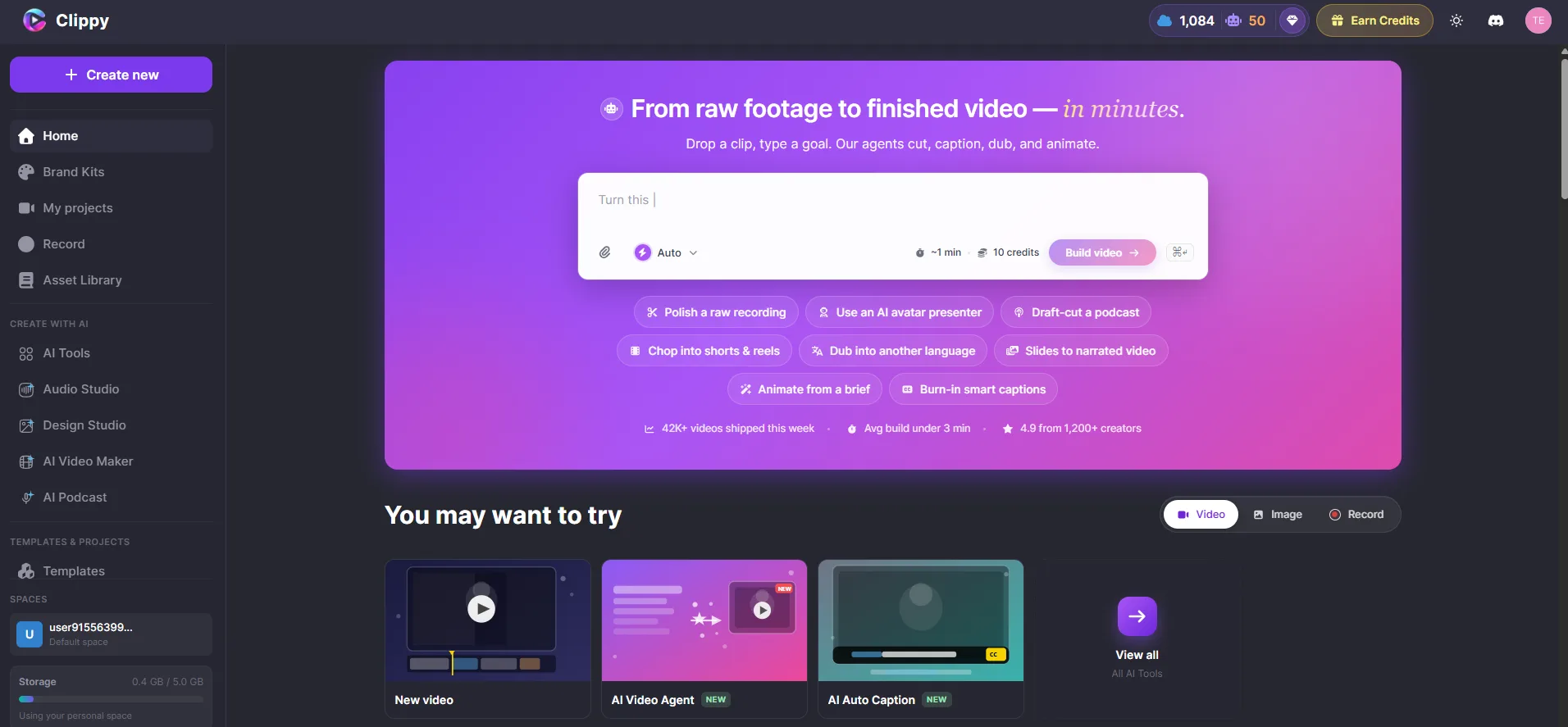
<p>Everything starts here: your projects, exports, and a clear path to create something new.</p>
<p><img decoding="async" loading="lazy" alt="Clippy dashboard" src="https://docs.clippy.io/assets/images/clippy-dashboard-ec270210a56e1145dbbe4a59ddcdb26b.webp" width="1912" height="887" class="img_ev3q"></p>
<p>No install wizard. No "which version of the app do you have?" Sign in and start.</p>
<hr>
<h2 class="anchor anchorTargetStickyNavbar_Vzrq" id="the-problem-we-kept-seeing">The problem we kept seeing<a href="https://docs.clippy.io/blog/introducing-clippy-deep-dive/#the-problem-we-kept-seeing" class="hash-link" aria-label="Direct link to The problem we kept seeing" title="Direct link to The problem we kept seeing" translate="no">​</a></h2>
<p>Most people don't fail at video because they lack taste. They fail because the workflow is fragmented:</p>
<ul>
<li class="">Write the script in one app</li>
<li class="">Find stock footage in another</li>
<li class="">Record voiceover somewhere else</li>
<li class="">Fight the timeline in a fourth tool</li>
<li class="">Export, re-export, fix the aspect ratio, post, hope for the best</li>
</ul>
<p>Brands have it worse. Every clip is a little off-palette. Every caption uses the wrong font. Every video feels <em>fine</em> — but not <em>theirs</em>.</p>
<p>We wanted one calm surface where creativity compounds instead of resets.</p>
<hr>
<h2 class="anchor anchorTargetStickyNavbar_Vzrq" id="what-you-can-do-with-clippy">What you can do with Clippy<a href="https://docs.clippy.io/blog/introducing-clippy-deep-dive/#what-you-can-do-with-clippy" class="hash-link" aria-label="Direct link to What you can do with Clippy" title="Direct link to What you can do with Clippy" translate="no">​</a></h2>
<h3 class="anchor anchorTargetStickyNavbar_Vzrq" id="1-generate-videos-from-text--the-ai-video-agent">1. Generate videos from text — the AI Video Agent<a href="https://docs.clippy.io/blog/introducing-clippy-deep-dive/#1-generate-videos-from-text--the-ai-video-agent" class="hash-link" aria-label="Direct link to 1. Generate videos from text — the AI Video Agent" title="Direct link to 1. Generate videos from text — the AI Video Agent" translate="no">​</a></h3>
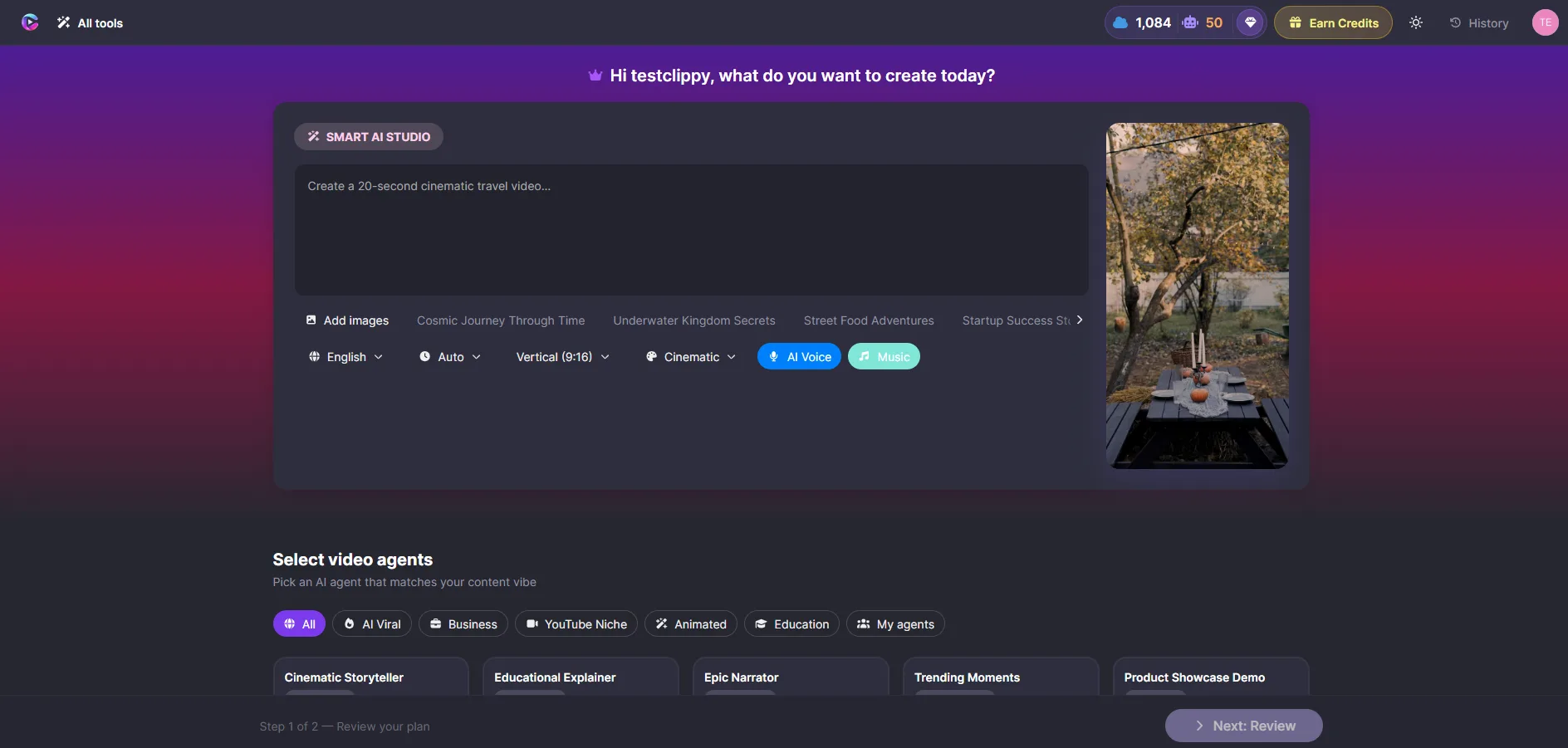
<p>Describe what you want. The <strong>AI Video Agent</strong> builds it: scenes, voiceover, captions, and media — arranged on your timeline, ready for you to refine.</p>
<p><img decoding="async" loading="lazy" alt="AI Video Agent" src="https://docs.clippy.io/assets/images/ai-video-agent-68dcd3072dfd82ecac4e456f46e4f3b7.webp" width="1888" height="901" class="img_ev3q"></p>
<p>Try something specific: <em>"30 second promo for our new product launch, professional tone, blue and white theme."</em> Choose a style — professional, cinematic, playful, modern — and let the Agent work while you watch progress in real time.</p>
<p>When it's done, everything is editable. Reorder scenes. Swap media. Regenerate a single scene. You're never locked in.</p>
<h3 class="anchor anchorTargetStickyNavbar_Vzrq" id="2-edit-with-a-full-canvas-and-timeline">2. Edit with a full canvas and timeline<a href="https://docs.clippy.io/blog/introducing-clippy-deep-dive/#2-edit-with-a-full-canvas-and-timeline" class="hash-link" aria-label="Direct link to 2. Edit with a full canvas and timeline" title="Direct link to 2. Edit with a full canvas and timeline" translate="no">​</a></h3>
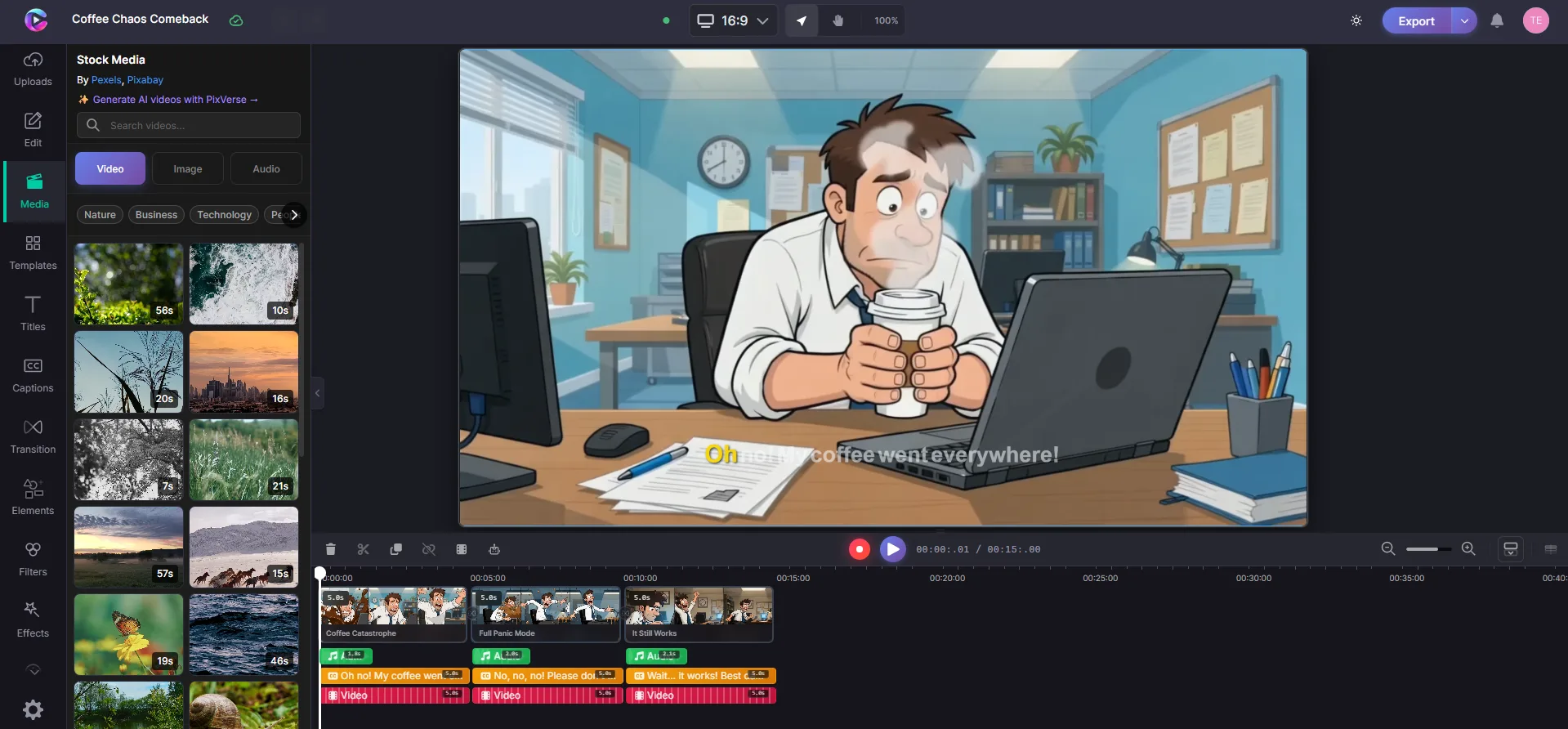
<p>Clippy isn't a one-shot generator that dumps an MP4 and waves goodbye. It's a <strong>real video editor</strong>:</p>
<ul>
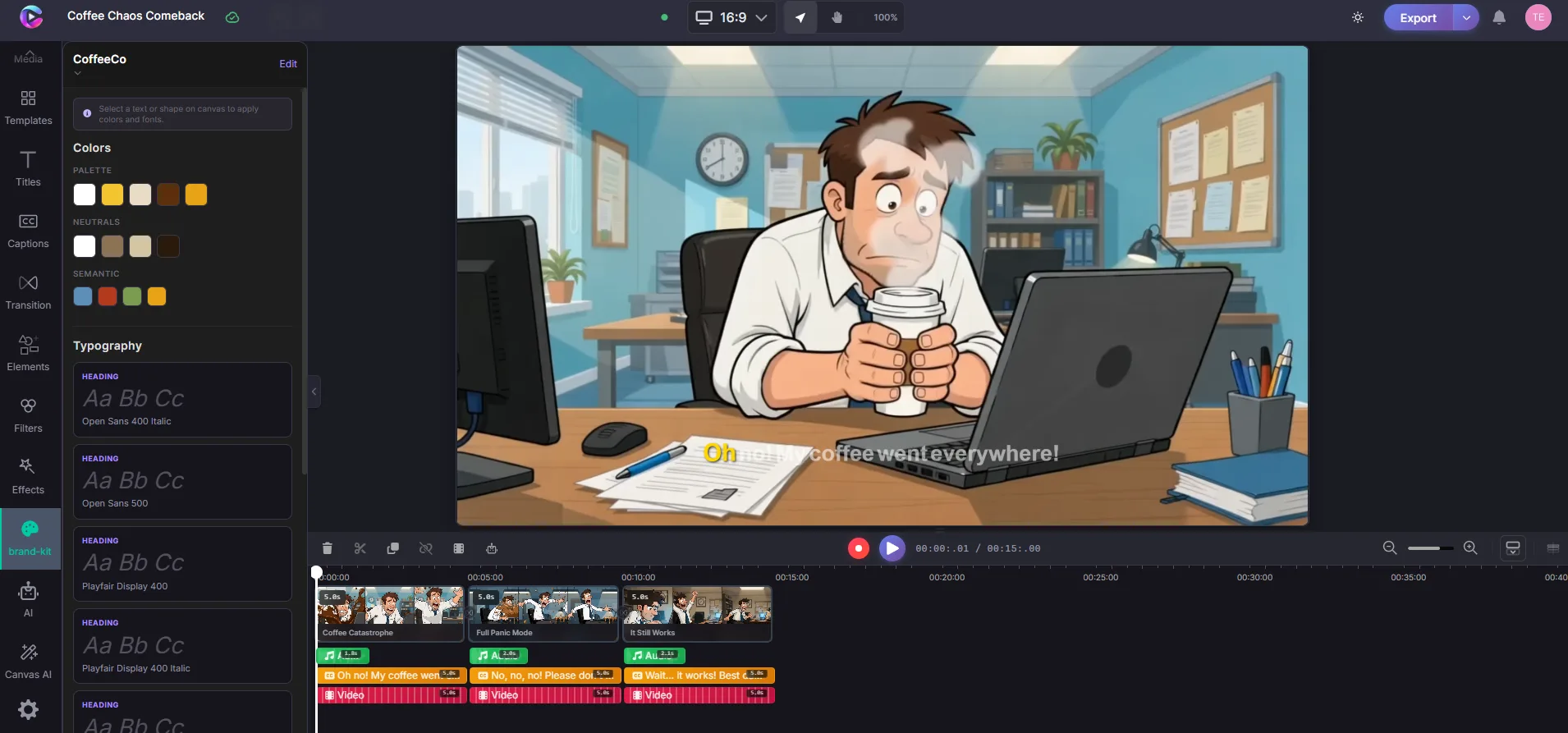
<li class=""><strong>Canvas</strong> — see every clip, image, text layer, and shape exactly as it will export</li>
<li class=""><strong>Timeline</strong> — trim, layer, snap, and zoom to frame-level detail</li>
<li class=""><strong>Media library</strong> — uploads, stock search, and AI tools in one panel</li>
</ul>
<p><img decoding="async" loading="lazy" alt="Editor canvas and timeline" src="https://docs.clippy.io/assets/images/ai-video-editor-scene-timeline-5a1655f717b14a62a4e461d0e5219365.webp" width="1919" height="892" class="img_ev3q"></p>
<p>AI gets you most of the way there. The editor is where you make it <em>yours</em>.</p>
<h3 class="anchor anchorTargetStickyNavbar_Vzrq" id="3-ai-tools-built-in">3. AI tools, built in<a href="https://docs.clippy.io/blog/introducing-clippy-deep-dive/#3-ai-tools-built-in" class="hash-link" aria-label="Direct link to 3. AI tools, built in" title="Direct link to 3. AI tools, built in" translate="no">​</a></h3>
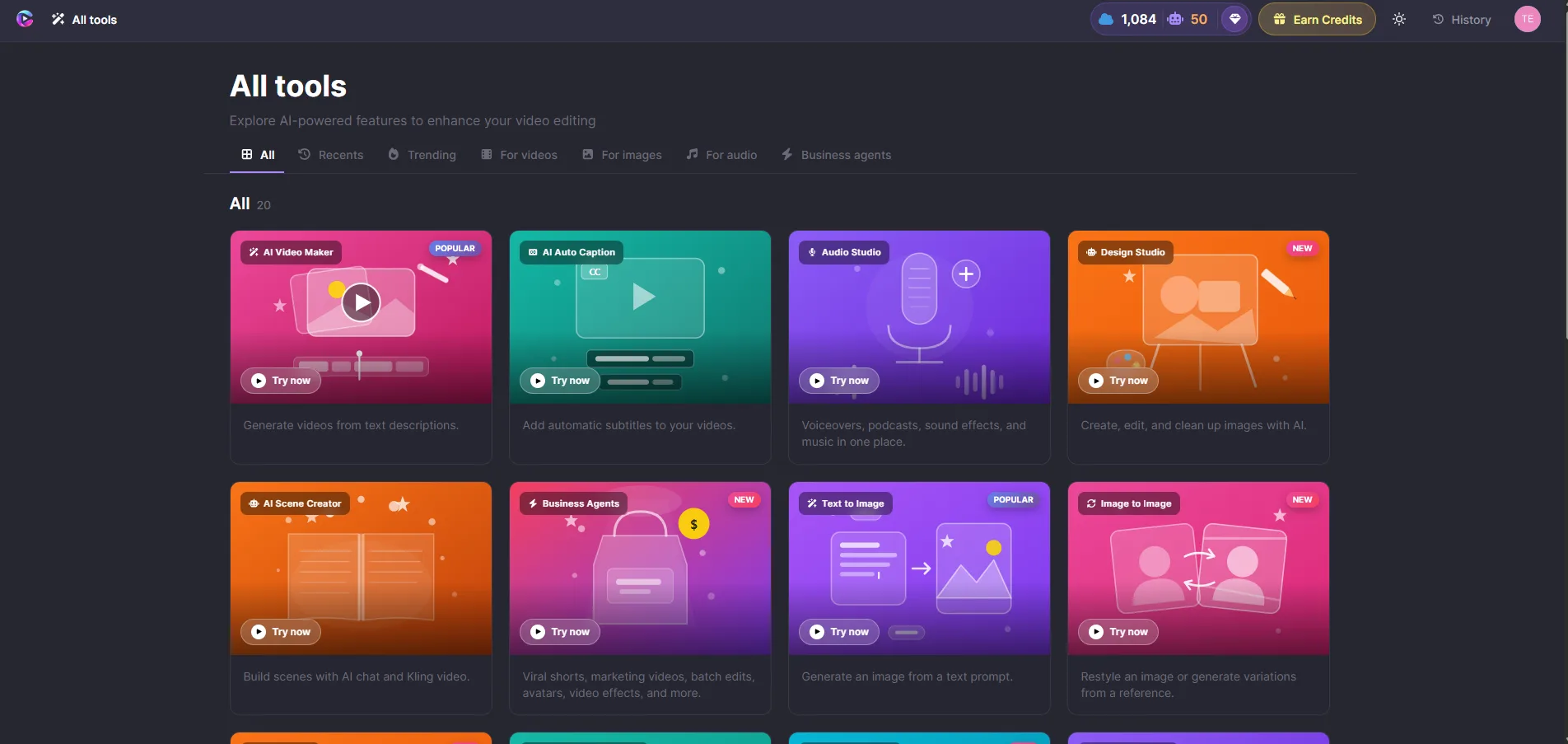
<p>Voiceover, auto captions, background removal, stock media, and more — without leaving the project.</p>
<p><img decoding="async" loading="lazy" alt="All AI tools in the editor" src="https://docs.clippy.io/assets/images/all-ai-tools-8b883507ca15e80036e62e2e71061b9a.webp" width="1904" height="903" class="img_ev3q"></p>
<table><thead><tr><th>Tool</th><th>What it does</th></tr></thead><tbody><tr><td><strong>AI Video Agent</strong></td><td>Full video from a text description</td></tr><tr><td><strong>AI Voiceover</strong></td><td>Natural narration synced to your timeline</td></tr><tr><td><strong>Auto Captions</strong></td><td>Transcribe speech, style to match your brand</td></tr><tr><td><strong>Background Removal</strong></td><td>Blur, replace, or swap backgrounds in clips</td></tr><tr><td><strong>Stock Media</strong></td><td>Search photos and videos inside the editor</td></tr></tbody></table>
<h3 class="anchor anchorTargetStickyNavbar_Vzrq" id="4-brand-kit--stay-on-brand-automatically">4. Brand Kit — stay on-brand automatically<a href="https://docs.clippy.io/blog/introducing-clippy-deep-dive/#4-brand-kit--stay-on-brand-automatically" class="hash-link" aria-label="Direct link to 4. Brand Kit — stay on-brand automatically" title="Direct link to 4. Brand Kit — stay on-brand automatically" translate="no">​</a></h3>
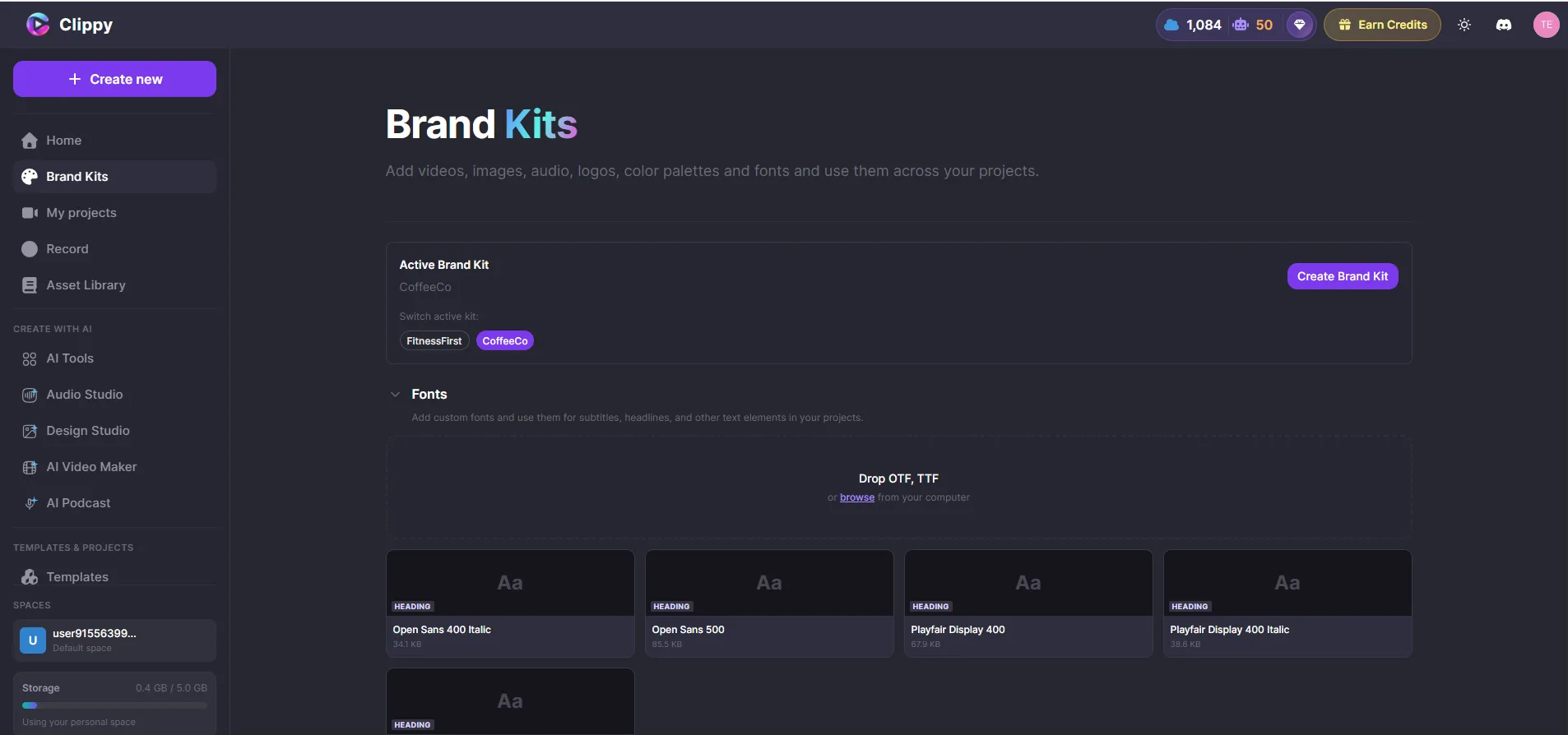
<p>Save your colors, fonts, and logo once. Use them in every project.</p>
<p><img decoding="async" loading="lazy" alt="Brand Kit in the editor" src="https://docs.clippy.io/assets/images/canvas-editor-brandkit-screen-ef94dca273f0c9e4019b2f7e9574048e.webp" width="1910" height="893" class="img_ev3q"></p>
<p><img decoding="async" loading="lazy" alt="Brand Kit panel" src="https://docs.clippy.io/assets/images/clippy-brandkit-15aa9de8a1c56e8695292aa005f0e89d.webp" width="1906" height="894" class="img_ev3q"></p>
<p>When you add text or captions, apply <strong>Brand Styles</strong> in one click. Your palette shows up first in every color picker. Your logo is always one insert away.</p>
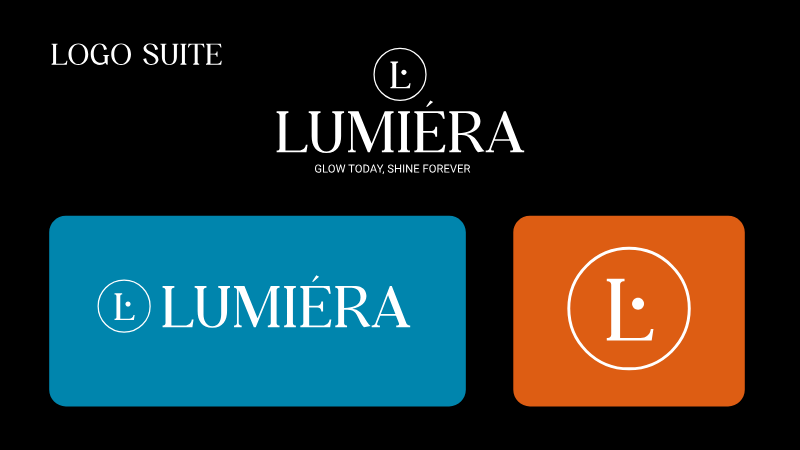
<p>Clippy also supports rich brand identities for AI-generated video — so a luxury skincare line and a neighborhood café don't end up looking like the same template:</p>
<p><strong>Lumiéra Skincare</strong> — editorial, luminous, considered:</p>
<p><img decoding="async" loading="lazy" alt="Lumiéra Skincare logo" src="https://docs.clippy.io/assets/images/lumiera-logo-primary-187f78a5202f00f2da636b327778a332.png" width="800" height="450" class="img_ev3q"></p>
<p><strong>CoffeeCo</strong> — warm, approachable:</p>
<p><img decoding="async" loading="lazy" alt="CoffeeCo brand preview" src="https://docs.clippy.io/assets/images/coffeeco-brand-preview-d38c16e867d92d87107f603629870a86.jpg" width="2000" height="2000" class="img_ev3q"></p>
<p>Same platform. Different souls.</p>
<h3 class="anchor anchorTargetStickyNavbar_Vzrq" id="5-export-in-the-cloud">5. Export in the cloud<a href="https://docs.clippy.io/blog/introducing-clippy-deep-dive/#5-export-in-the-cloud" class="hash-link" aria-label="Direct link to 5. Export in the cloud" title="Direct link to 5. Export in the cloud" translate="no">​</a></h3>
<p>When you're happy, export to <strong>MP4</strong> in 720p, 1080p, or 4K. Rendering happens in the cloud — close your browser, come back later. Your finished video will be waiting in your dashboard.</p>
<hr>
<h2 class="anchor anchorTargetStickyNavbar_Vzrq" id="quick-start-60-seconds">Quick start (60 seconds)<a href="https://docs.clippy.io/blog/introducing-clippy-deep-dive/#quick-start-60-seconds" class="hash-link" aria-label="Direct link to Quick start (60 seconds)" title="Direct link to Quick start (60 seconds)" translate="no">​</a></h2>
<ol>
<li class="">Go to <a href="https://clippy.io/" target="_blank" rel="noopener noreferrer" class="">clippy.io</a> and sign in</li>
<li class="">Create a new project</li>
<li class="">Use the <strong>AI Video Agent</strong> to turn your idea into a video — or upload your own media</li>
<li class="">Arrange, trim, and style on the timeline</li>
<li class="">Export your finished video</li>
</ol>
<p>That's it. Browse the <a href="https://docs.clippy.io/" target="_blank" rel="noopener noreferrer" class="">Clippy docs</a> for deeper guides on captions, audio, animations, and more.</p>
<hr>
<h2 class="anchor anchorTargetStickyNavbar_Vzrq" id="who-clippy-is-for">Who Clippy is for<a href="https://docs.clippy.io/blog/introducing-clippy-deep-dive/#who-clippy-is-for" class="hash-link" aria-label="Direct link to Who Clippy is for" title="Direct link to Who Clippy is for" translate="no">​</a></h2>
<ul>
<li class=""><strong>Founders &amp; marketers</strong> shipping launch videos and social content on a schedule</li>
<li class=""><strong>Educators &amp; course creators</strong> who need clarity more than cinematic fog</li>
<li class=""><strong>Social managers</strong> publishing across formats without rebuilding from scratch</li>
<li class=""><strong>Small teams</strong> who want one toolkit instead of a Frankenstein stack</li>
<li class=""><strong>Anyone</strong> who's ever thought, <em>"I'll hire an editor later"</em> — and later never came</li>
</ul>
<hr>
<h2 class="anchor anchorTargetStickyNavbar_Vzrq" id="what-we-believe">What we believe<a href="https://docs.clippy.io/blog/introducing-clippy-deep-dive/#what-we-believe" class="hash-link" aria-label="Direct link to What we believe" title="Direct link to What we believe" translate="no">​</a></h2>
<p><strong>Creativity should feel light.</strong><br>
<!-- -->The best tools disappear while you work.</p>
<p><strong>Brand is a system, not a sticker.</strong><br>
<!-- -->Logos and colors belong in the pipeline, not pasted on at export.</p>
<p><strong>AI should assist, not replace, your judgment.</strong><br>
<!-- -->You approve the plan. You cut the scene. You own the final frame.</p>
<hr>
<h2 class="anchor anchorTargetStickyNavbar_Vzrq" id="a-note-from-the-builder">A note from the builder<a href="https://docs.clippy.io/blog/introducing-clippy-deep-dive/#a-note-from-the-builder" class="hash-link" aria-label="Direct link to A note from the builder" title="Direct link to A note from the builder" translate="no">​</a></h2>
<p>I'm Irfan, founder of Clippy. I spent years in software engineering watching brilliant people stall at the <em>production</em> step — not the idea step.</p>
<p>We didn't set out to build "another AI video toy." We set out to build the creative platform we wished existed: rigorous under the hood, gentle on the surface, honest about what AI is good at and what humans are good at.</p>
<p>Clippy is that bet — still growing, still learning. If you try it, we'd genuinely love your feedback.</p>
<hr>
<h2 class="anchor anchorTargetStickyNavbar_Vzrq" id="come-say-hello">Come say hello<a href="https://docs.clippy.io/blog/introducing-clippy-deep-dive/#come-say-hello" class="hash-link" aria-label="Direct link to Come say hello" title="Direct link to Come say hello" translate="no">​</a></h2>
<ul>
<li class=""><strong>Website:</strong> <a href="https://clippy.io/" target="_blank" rel="noopener noreferrer" class="">clippy.io</a></li>
<li class=""><strong>Editor:</strong> <a href="https://app.clippy.io/" target="_blank" rel="noopener noreferrer" class="">app.clippy.io</a></li>
<li class=""><strong>Documentation:</strong> <a href="https://docs.clippy.io/" target="_blank" rel="noopener noreferrer" class="">docs.clippy.io</a></li>
</ul>
<p>Start with a brief. Bring your brand kit if you have one. Make something you'd actually post.</p>
<p>We'll be here — timeline open, captions ready.</p>]]></content>
        <author>
            <name>Clippy Team</name>
            <uri>https://clippy.io</uri>
        </author>
        <category label="Product" term="Product"/>
        <category label="Launch" term="Launch"/>
        <category label="AI Video Editor" term="AI Video Editor"/>
    </entry>
    <entry>
        <title type="html"><![CDATA[Introducing Clippy — AI Video Editing in Your Browser]]></title>
        <id>https://docs.clippy.io/blog/introducing-clippy/</id>
        <link href="https://docs.clippy.io/blog/introducing-clippy/"/>
        <updated>2025-06-18T00:00:00.000Z</updated>
        <summary type="html"><![CDATA[For brand marketing teams, producing video content has always meant juggling multiple tools, waiting on renders, and coordinating across specialists. We built Clippy to change that.]]></summary>
        <content type="html"><![CDATA[<p>For brand marketing teams, producing video content has always meant juggling multiple tools, waiting on renders, and coordinating across specialists. We built Clippy to change that.</p>
<p><strong>Clippy is an AI-powered video editor that runs entirely in your browser.</strong> No downloads, no rendering queues on your machine, no switching between apps.</p>
<p><img decoding="async" loading="lazy" alt="Clippy Dashboard" src="https://docs.clippy.io/assets/images/clippy-dashboard-ec270210a56e1145dbbe4a59ddcdb26b.webp" width="1912" height="887" class="img_ev3q"></p>
<h2 class="anchor anchorTargetStickyNavbar_Vzrq" id="what-makes-clippy-different">What makes Clippy different<a href="https://docs.clippy.io/blog/introducing-clippy/#what-makes-clippy-different" class="hash-link" aria-label="Direct link to What makes Clippy different" title="Direct link to What makes Clippy different" translate="no">​</a></h2>
<p><strong>AI Video Agent</strong> — describe what you want and the AI builds scenes, adds media, generates voiceover, and creates captions. Everything lands on your timeline ready to refine.</p>
<p><strong>Professional timeline</strong> — a full multi-track editor with drag-and-drop, trimming, layering, 80+ animation effects, and GL transitions between scenes.</p>
<p><strong>Cloud rendering</strong> — when your video is ready, export in 720p, 1080p, or 4K. Rendering happens in the cloud so your computer stays free. Close the tab and come back later.</p>
<p><strong>Brand Kit</strong> — save your brand colors, fonts, and logo once. Every video stays on-brand with one click.</p>
<h2 class="anchor anchorTargetStickyNavbar_Vzrq" id="get-started">Get started<a href="https://docs.clippy.io/blog/introducing-clippy/#get-started" class="hash-link" aria-label="Direct link to Get started" title="Direct link to Get started" translate="no">​</a></h2>
<p>Go to <a href="https://clippy.io/" target="_blank" rel="noopener noreferrer" class="">clippy.io</a>, create a project, and try the AI Video Agent. Your first video takes minutes, not days.</p>]]></content>
        <author>
            <name>Clippy Team</name>
            <uri>https://clippy.io</uri>
        </author>
        <category label="Product" term="Product"/>
        <category label="Launch" term="Launch"/>
        <category label="AI Video Editor" term="AI Video Editor"/>
    </entry>
    <entry>
        <title type="html"><![CDATA[How the AI Video Agent Creates Videos From a Text Description]]></title>
        <id>https://docs.clippy.io/blog/ai-video-agent/</id>
        <link href="https://docs.clippy.io/blog/ai-video-agent/"/>
        <updated>2025-06-17T00:00:00.000Z</updated>
        <summary type="html"><![CDATA[The AI Video Agent is the fastest way to create a video in Clippy. Type what you want, and the Agent handles the rest — scripting, media selection, voiceover, captions, and transitions.]]></summary>
        <content type="html"><![CDATA[<p>The AI Video Agent is the fastest way to create a video in Clippy. Type what you want, and the Agent handles the rest — scripting, media selection, voiceover, captions, and transitions.</p>
<h2 class="anchor anchorTargetStickyNavbar_Vzrq" id="how-it-works">How it works<a href="https://docs.clippy.io/blog/ai-video-agent/#how-it-works" class="hash-link" aria-label="Direct link to How it works" title="Direct link to How it works" translate="no">​</a></h2>
<ol>
<li class="">Open the <strong>AI Video Agent</strong> from the editor toolbar</li>
<li class="">Describe your video — for example: <em>"30 second product launch video, professional tone, blue theme"</em></li>
<li class="">Choose a style and click <strong>Generate</strong></li>
</ol>
<p>The Agent shows progress as it works. When it finishes, everything is on your timeline.</p>
<p><img decoding="async" loading="lazy" alt="AI Video Agent panel" src="https://docs.clippy.io/assets/images/ai-video-agent-68dcd3072dfd82ecac4e456f46e4f3b7.webp" width="1888" height="901" class="img_ev3q"></p>
<h2 class="anchor anchorTargetStickyNavbar_Vzrq" id="what-gets-created">What gets created<a href="https://docs.clippy.io/blog/ai-video-agent/#what-gets-created" class="hash-link" aria-label="Direct link to What gets created" title="Direct link to What gets created" translate="no">​</a></h2>
<table><thead><tr><th>Component</th><th>Description</th></tr></thead><tbody><tr><td><strong>Scenes</strong></td><td>Structured scenes with relevant media from stock libraries</td></tr><tr><td><strong>Voiceover</strong></td><td>AI narration synced to each scene, with voice selection</td></tr><tr><td><strong>Captions</strong></td><td>Auto-generated captions styled to match your brand</td></tr><tr><td><strong>Transitions</strong></td><td>Smooth transitions between every scene</td></tr></tbody></table>
<h2 class="anchor anchorTargetStickyNavbar_Vzrq" id="everything-is-editable">Everything is editable<a href="https://docs.clippy.io/blog/ai-video-agent/#everything-is-editable" class="hash-link" aria-label="Direct link to Everything is editable" title="Direct link to Everything is editable" translate="no">​</a></h2>
<p>The AI builds a first draft — you have full control afterward. Reorder scenes, swap media, edit text, change the voiceover script and regenerate. The timeline stays yours to tweak however you want.</p>
<h2 class="anchor anchorTargetStickyNavbar_Vzrq" id="tips-for-better-results">Tips for better results<a href="https://docs.clippy.io/blog/ai-video-agent/#tips-for-better-results" class="hash-link" aria-label="Direct link to Tips for better results" title="Direct link to Tips for better results" translate="no">​</a></h2>
<ul>
<li class="">Be specific in your description. Include tone, length, and visual style</li>
<li class="">Mention your brand colors or theme if you have one</li>
<li class="">Use the Agent for a first draft, then polish manually for a custom touch</li>
</ul>
<p>Try it at <a href="https://clippy.io/" target="_blank" rel="noopener noreferrer" class="">clippy.io</a> — no credit card, no download.</p>]]></content>
        <author>
            <name>Clippy Team</name>
            <uri>https://clippy.io</uri>
        </author>
        <category label="AI" term="AI"/>
        <category label="Features" term="Features"/>
        <category label="Video Agent" term="Video Agent"/>
    </entry>
</feed>